Airbnb Cleaning Checklist
A room-by-room turnover checklist for short-term rentals that you can tick, edit and print.
Recent
Your last 10 settings, saved only in this browser. Nothing is uploaded.
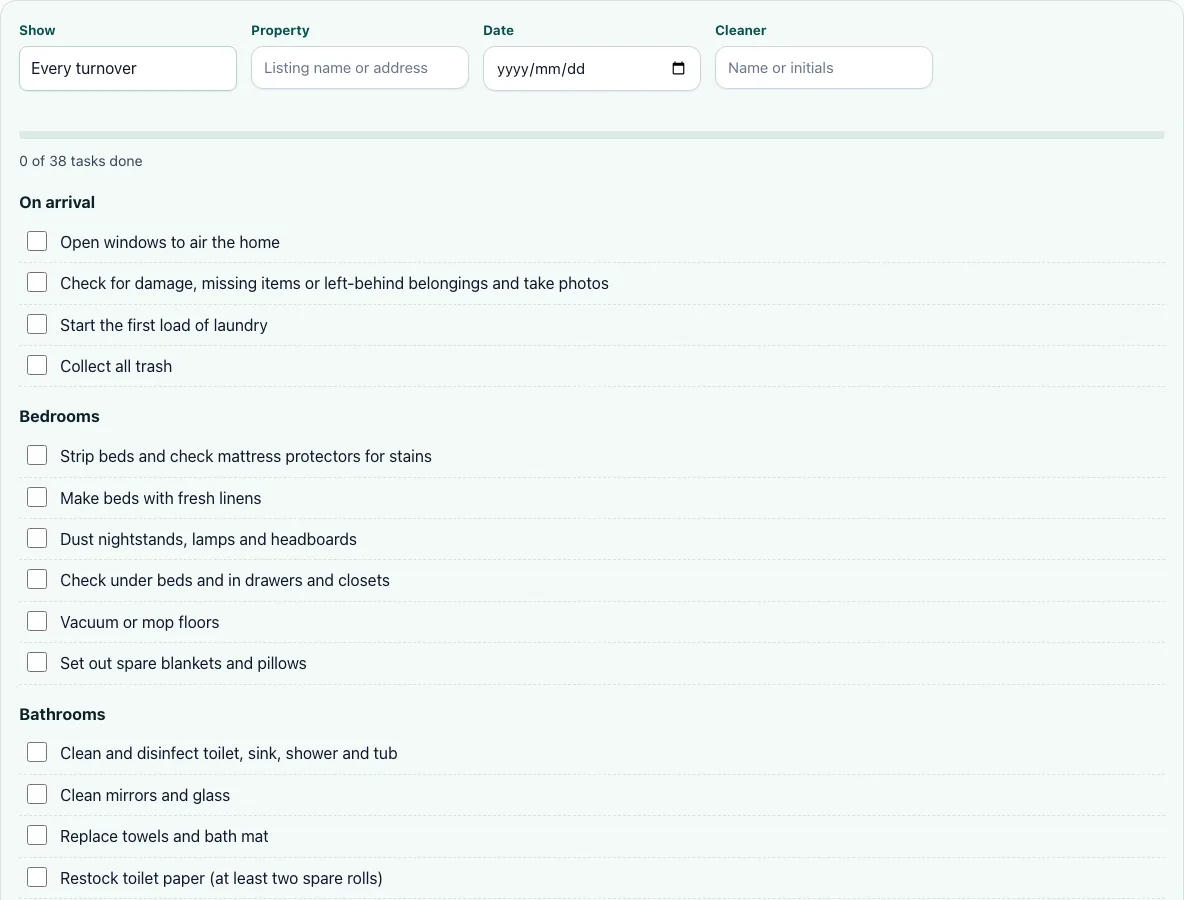
The Airbnb Cleaning Checklist is a free tool that gives you a ready-made list of 38 tasks for turning over a short-term rental between guests. It works as a vacation rental cleaning checklist, a short term rental cleaning checklist, or an airbnb turnover checklist, depending on how you use it. You tick each task as you finish it, and a progress bar shows how much of the list is done. The tool runs in your browser, needs no account or sign-up, and works on phones. The tasks are grouped into six sections, from the arrival check to the final walkthrough, so the same order is followed every time.
Use it for each guest turnover, whether you clean the property yourself or hand the work to a cleaner. The list is a standard for every stay, not a deep clean. You can add your own tasks for anything specific to your property.
How to use the Airbnb Cleaning Checklist
- Type the site or property name into the site/property field so the header identifies the home.
- Set the Date for the turnover.
- Enter the cleaner’s name or initials in the Cleaner field.
- Use Show to filter tasks by frequency. Every task is marked “Every turnover,” so that setting keeps the full standard list in view.
- Work down the sections in order, and tick each task’s checkbox when it is done.
- Watch the progress bar, which counts your ticked tasks.
- To add a task for your property, select “Add your own task,” then choose a Section and How often.
- Select Print to get a paper copy with blank boxes and the filled-in header.
- Select Clear ticks before the next turnover to start again.
Use the progress bar as a final check. If it has not reached the end, look for unticked boxes in the earlier sections before you leave the property. Print is useful when a cleaner works from paper: the boxes are blank, so the cleaner can tick them by hand, and the header still shows the property and date you entered.
Sharing a checklist with cleaners and keeping one list per property are coming soon and are not available yet. Until then, Print is the simplest way to hand the list to someone else.
What should be on an Airbnb cleaning checklist?
A useful Airbnb cleaning checklist covers every room and every item a guest uses, arranged in the order you would walk through the property. The list in this tool has 38 tasks across six sections: On arrival (4), Bedrooms (6), Bathrooms (8), Kitchen (8), Living areas (6), and Outside and final check (6).
The order matters. Starting with the arrival section means you see the state of the property before you start moving things. Working room by room prevents backtracking, and finishing with the outside and final check catches anything missed inside. Bathrooms and the kitchen carry the most tasks, eight each, so they are the longest parts of the list. Every task is marked “Every turnover,” which makes the list a repeatable standard for each guest rather than a one-off deep clean. If you need a deeper level of work, that is a separate job with its own scope.
What should Airbnb cleaners restock?
Restock items are the supplies guests use up between stays. The list includes toilet paper, soap, shampoo, conditioner, coffee, tea, dish soap, sponges, and paper towels. These are the items that a guest sees first when they open the bathroom or the kitchen, so they are checked in the room sections rather than left to the end.
Toilet paper has a specific rule: keep two spare rolls available in addition to the one in the holder. For the other items, check what is left against what the last guest would have used, and top up anything running low before the next arrival. A short list of restock items, checked on every turnover, is easier to keep up than a long list checked once a month.
How do you report damage after a guest leaves?
Damage checks start in the first section says to check for damage and left-behind items, and to take photos as you go, so you have a record before anything is moved. The last section says to take final photos of every room. It also says to report any damage and low supplies to the host.
Photos taken at arrival and at the final check give you a before and after for each turnover. Keep them with the date you entered in the checklist header, so you can match a report to the stay it belongs to.
How long does an Airbnb turnover take?
This tool does not record or estimate time, so it cannot give a figure for your property. Each property is different, and the time depends on its size and how much the last guest used. To find your own number, note the start and finish times for your next few turnovers and average them.
Use the progress bar to see how far through the list you are at any point. If one section always takes longer than the others, that is where a cleaner’s time goes, and it is worth knowing before you agree on a price.
Frequently asked questions
Can I add my own tasks for my property?
Yes. Select “Add your own task,” then pick a Section and a How often value for the task. Your own tasks are saved in your browser only, the same as your ticks.
Is my checklist saved or uploaded?
Your ticks and your own tasks are saved in your browser only, and nothing is uploaded. Select Clear ticks to reset the checkboxes for a new turnover.
What if I use a different browser or device?
Your ticks and own tasks are kept in the browser on that device, so a different browser or device starts with its own list. Use the same browser each time to keep your progress. Print gives you a paper copy if you need to move the list between devices. Ticks from one device do not appear on another. Ticks from one device do not appear on another.
Does this tool need an account?
No. The tool is free, runs in your browser, and needs no account or sign-up. It also works on phones. Because there is no account, there is no password to set up or keep safe. Because there is no account, there is no password to set up or keep safe.
Is this tool affiliated with Airbnb?
No. Airbnb is named only to describe the kind of use the checklist is for, and the tool is not affiliated with Airbnb. The list is a general turnover checklist, so you can adapt it to your own property.
Can I use this checklist for an office?
This checklist is written for short-term rentals, so its sections and restock items are set up for guests. For a workplace, the office cleaning checklist on this site is the better starting point.
Related tools
- Airbnb cleaning fee calculator: Use it to work out what to charge guests for the cleaning.
- Office cleaning checklist: Use it when you need a checklist for a workplace instead of a rental.
- House cleaning cost calculator: Use it to estimate what a home cleaning job will cost.
- Deep cleaning cost: Use it when a property needs a deeper clean than a regular turnover.
- Cleaning invoice template: Use it to bill a client or host for a completed cleaning.
- Cleaning contract template: Use it to set out the terms of an ongoing cleaning arrangement.