Cleaning Bid Calculator
Work out a monthly bid for a cleaning contract, with every cost line shown.
Recent
Your last 10 settings, saved only in this browser. Nothing is uploaded.
The cleaning bid calculator estimates a monthly price for a cleaning contract, so you can quote a client a number that covers your labor, supplies, overhead, and profit. You enter the area, the type of space, how often it is cleaned, and your costs, and the tool builds the bid for you. It works for commercial cleaning bids, such as an office on a weekly schedule, and it shows the result per visit, per square foot, and per labor hour. The tool is free, runs in your browser, and needs no account or sign-up. Use it to test different wages, margins, and visit schedules before you write a proposal.
The tool follows a cost-plus method. It adds labor, payroll burden, supplies and overhead, then adds your profit margin to reach the price. Every cost line is shown, so you can see which number to change first.
How to use the Cleaning Bid Calculator
- Enter the Area to clean in square feet. The default is an 8,000 sq ft office.
- Choose the Type of space. This sets the production rate, which is how many square feet a cleaner covers per hour. If you know your crew’s real speed, change Production rate (sq ft/hr). The default is 2,000 sq ft/hr.
- Set Cleanings per week. The default is 5.
- Select your State. Leave Cleaner wage ($/hr) empty to use the state median for janitors and cleaners, or type the wage you plan to pay.
- Review Payroll burden (%), Supplies (%), Overhead (%), and Profit margin (%). The starting points are 20%, 5%, 10%, and 15%. Change them to match your own costs.
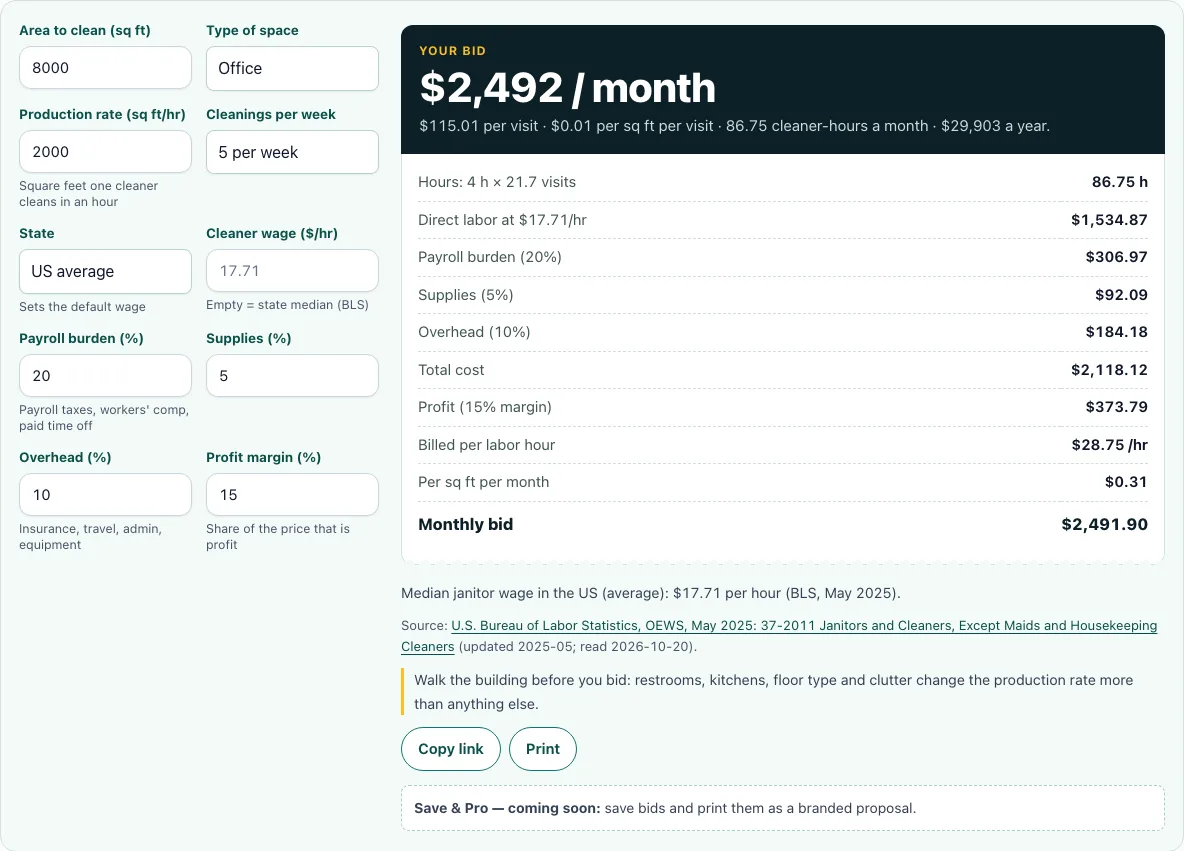
- Read the monthly bid in the box at the top of the results. Then check the receipt for hours, direct labor, burden, supplies, overhead, total cost, and profit.
Read the bid from the top down. The monthly box is the number to quote, and the receipt shows how it was built. If the labor line looks too high, check the production rate first, because it sets the hours that the wage is multiplied by.
Click Copy link to share or bookmark the exact estimate, because your settings are kept in the page address. Click Print to print the result.
How do you bid a commercial cleaning job?
Work out the hours the job needs, price those hours, then add costs and profit. The bid equals total cost divided by (1 minus profit margin), so a 15% margin means your cost is 85% of the price. Hours per visit equal area divided by production rate, and monthly hours equal hours per visit times weekly visits times 52 ÷ 12. With the default office, 8,000 ÷ 2,000 gives 4 hours per visit, and 4 × 5 × 52 ÷ 12 gives about 86.7 hours a month. Labor is 86.7 × $17.71, or about $1,535. Adding burden, supplies, and overhead brings total cost to $2,118, and $2,118 ÷ 0.85 gives a bid of $2,492 a month.
What is payroll burden?
Payroll burden is the extra cost an employer pays on top of a worker’s wage. It includes employer payroll taxes, such as the 7.65% for Social Security and Medicare, plus unemployment taxes and workers’ compensation insurance. In the calculator, burden is a percentage of direct labor, and the default is 20%. If you leave it out, your bid will not cover costs you actually pay. Unemployment and workers’ comp rates vary by state and by business, so use your own figures where you have them.
How many hours will the job take?
Divide the area by the production rate to get the hours for one visit, then multiply by the number of visits. The production rate is the square footage one cleaner covers per hour, and it depends on the type of space and the tasks included. Time a sample area if you can, because a rate that looks good on paper may be too fast for a building with many restrooms or detailed work. Monthly visits are weekly visits times 52 ÷ 12, which is about 4.33 weeks per month.
Should I bid per square foot or per hour?
Base your main price on hours, and use the per square foot figure as a comparison. Labor hours tie your price to the actual time the work takes, so the bid still covers your costs when the building has different needs. Per square foot is easy for clients to compare, but it can hide differences, such as a space with many bathrooms compared with an open floor. The default example shows the same bid three ways: $115.01 per visit, $0.014 per sq ft per visit, and $28.75 per labor hour.
What profit margin should a cleaning business use?
The calculator starts at 15%, but no single margin fits every business. Start with the default, then change it based on the risk you carry and the growth you want. Margin is a share of the price, not a markup on cost. A 15% margin on a $2,118 cost gives a $2,492 bid and $374 of profit, while a 15% markup would give only $2,436. Check what similar local businesses charge if you can, since a margin that looks right on paper may not win the job.
Frequently asked questions
Is the cleaning bid calculator free?
Yes. It is free, runs in your browser, and needs no account or sign-up. Nothing you type is uploaded. The page works on phones too, and wide tables scroll sideways inside their box.
Can I save my estimates?
Not yet. A note under the tool says saving estimates and branded quotes are coming soon. For now, use Copy link to keep the exact settings.
What happens if I leave the wage blank?
The tool uses the state median wage for janitors and cleaners, based on BLS data from May 2025. For the US, that median is $17.71 an hour. Enter your own wage if you pay more or less.
Why does my bid change when I change the profit margin?
The bid equals total cost divided by (1 minus margin), so a higher margin raises the price faster than it seems. In the default example, moving the margin from 15% to 25% raises the monthly bid from $2,492 to about $2,824.
What do the Supplies and Overhead percentages apply to?
Both apply to labor plus payroll burden, not to labor alone. Supplies defaults to 5% and overhead to 10%, and you can change either in its box. Because they follow the wage bill, a higher wage raises these lines as well.
Can I see the bid per visit instead of per month?
Yes. The result shows the bid per visit, per square foot per visit, and per month, along with the bid per year. Use the per visit figure if the client pays for each cleaning rather than on a monthly contract.
Related tools
- Janitorial bid calculator: Use it when you are pricing janitorial work that goes beyond basic cleaning.
- Commercial cleaning cost calculator: Use it to see what a cleaning job costs you before you add a margin.
- Commercial cleaning rates per square foot: Use it to compare your per square foot price with typical rate ranges.
- Cleaning proposal template: Use it to turn your bid into a written proposal for a client.
- Cleaning contract template: Use it when you are ready to put the agreed price and terms in writing.
- Office cleaning checklist: Use it to list the tasks included in the job so your hours match the work.