Cleaning Estimate Template
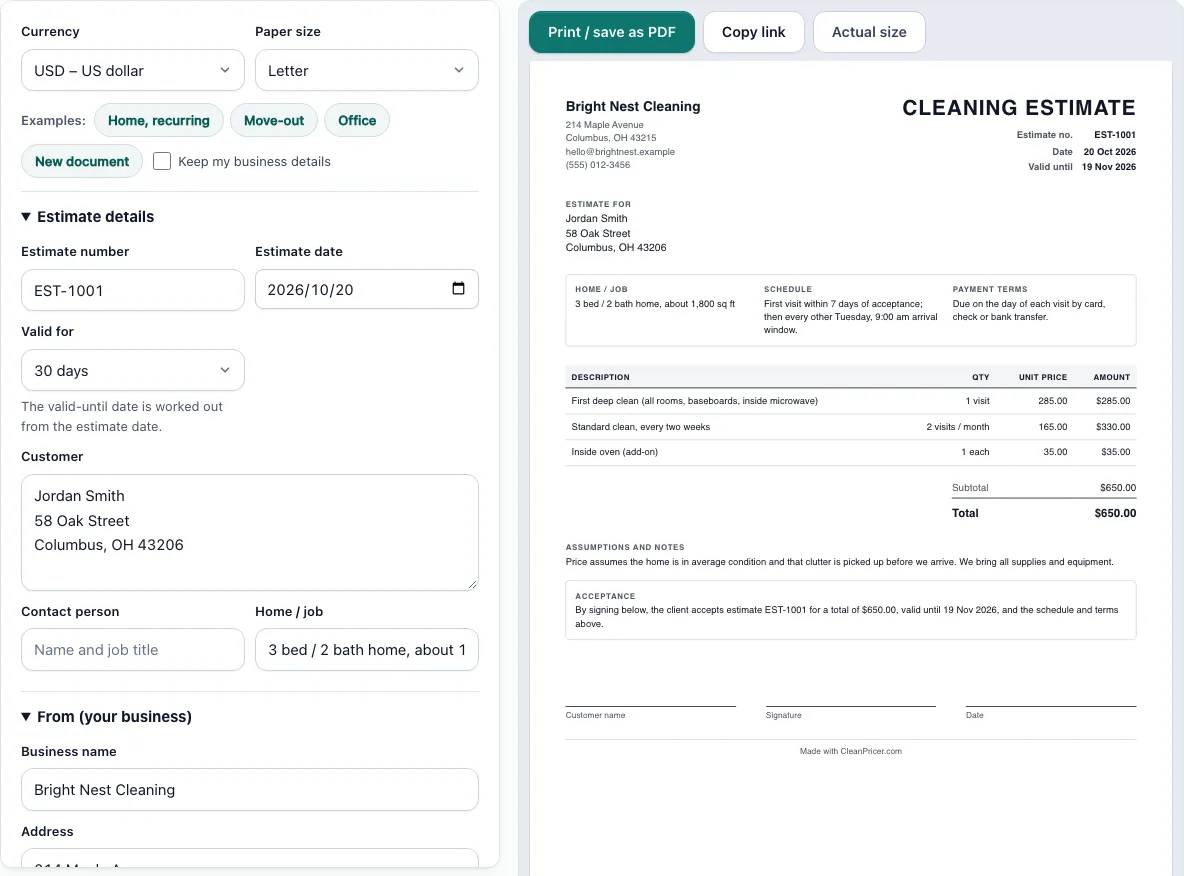
Fill in the estimate on the left; the finished page updates on the right, ready to print.
Recent
Your last 10 settings, saved only in this browser. Nothing is uploaded.
This free cleaning estimate template lets you build a printable cleaning estimate in your browser, with no sign-up and no account to create. Fill in the form on the left and watch the live paper preview on the right, set to US Letter or A4, so you can check the layout before you print. It works as a house cleaning estimate template, a cleaning quote template, or a general cleaning service estimate.
Each service goes on its own line with a quantity, a unit price, and an optional line discount. The totals are worked out for you, and a “How the totals were calculated” list shows every step, so your client can see exactly what the total covers. Everything you type is saved in your browser as you go, and nothing is uploaded to a server.
How to use the Cleaning Estimate Template
- Choose Letter or A4 paper, and pick your currency from the Currency select.
- Open the form sections on the left. Enter the Estimate number, Estimate date and Valid for period (7, 14, 30, 45, 60 or 90 days, or pick a date).
- Fill in Client, Contact person and Home / job.
- Enter your business name, address, email, phone and tax ID.
- In the items list, add each service with a Description, Qty, Unit, Unit price and, if needed, a Disc. % for that line.
- Set a document discount (percent or fixed) and choose tax: none, one rate, or a rate per item.
- Enter a Document title such as CLEANING ESTIMATE, ESTIMATE or QUOTE. Then complete Schedule, Payment terms and Assumptions and notes.
- Optionally upload a logo (PNG, JPG or SVG, up to 300 KB). It is kept in this browser only.
- Check the preview and the “How the totals were calculated” list to confirm each step.
- Click Print / save as PDF to print just the document.
To start faster, load one of the example buttons (Home recurring, Move-out or Office) and replace its details with yours.
Read the totals list line by line before you send. If a line total looks wrong, check its quantity, unit price and Disc. “Copy link” stores the whole document inside the link, so you can share it without a separate file.
What should a cleaning estimate include?
A cleaning estimate should name your business and client, give the estimate number and date, and list each service with its price. It should also show the tax, the total, how long the estimate stays valid, and when the work can start. The Assumptions and notes field is the place to state what the price covers.
Itemized lines matter most. A total of $650.00 with no lines tells the client nothing, but a list that shows a first deep clean, two recurring visits, and an add-on helps them see why the number is what it is.
How do I write a cleaning estimate?
Start with the services the client asked for, and give each one its own line. Enter the quantity and unit price, then use the line discount only if you are reducing that specific service. Keep descriptions short and concrete, such as “Inside oven” rather than “Extras.”
Next, set the document discount and tax, then read the preview. The example buttons show a complete estimate, which is useful if you want to see how the schedule, payment terms, and notes fit together before you fill in your own.
How long should an estimate be valid?
The form offers 7, 14, 30, 45, 60, and 90 days, or a date you pick. Choose a shorter period when your supply or labor costs may change soon, and a longer one when the work is planned for a later date. A clear end date tells the client when the price stops applying.
What is the difference between an estimate and a quote?
An estimate is the expected price for work, while a quote is usually a fixed offer. Many cleaners use the two words interchangeably, so the choice matters less than being clear about what the number means. The Document title field lets you print CLEANING ESTIMATE, ESTIMATE, or QUOTE at the top of the page.
If you want the price to stay fixed, say so in Assumptions and notes and keep the valid period short enough that the price stays accurate.
Can the client sign the estimate?
Yes. The document has an acceptance block with signature lines, so the client can sign the printed or saved PDF page. The tool does not collect signatures online, so the client signs the page itself and returns it to you.
Frequently asked questions
Is this cleaning estimate template free to use?
Yes. The template is free and needs no sign-up, so you can make as many estimates as you like. Open the page, fill in the form, and print or save the document as a PDF. Each estimate you make is a separate document, so one client’s details do not affect another. Start with an example button if you want to see a finished layout first.
Is my client information uploaded anywhere?
No. Your business details, client details, and items are saved in your browser only, and nothing is uploaded. If you clear your browser data, the saved document is removed from that browser, so keep a PDF of any estimate you send.
Can I use my own currency and paper size?
Yes. The Currency select includes many currencies, and you can choose Letter or A4 paper for the preview and print. The totals use the currency you pick.
Why does the printed page say “Made with CleanPricer.com”?
The printed page carries a small line with that name. It is part of the current version of the document. A note on the page says that removing that footer line and saving templates are coming soon, so they are not available yet.
Can I add my logo?
Yes. Upload a PNG, JPG, or SVG file of up to 300 KB. The logo is kept in this browser only, so you need to upload it again if you open the page on a different computer. Keep the file small and simple so the page prints cleanly.
Related tools
- House cleaning estimate calculator: use it to work out a price before you write the estimate.
- Cleaning proposal template: use it when you want to present your services and approach in more detail.
- Cleaning invoice template: use it to bill the client once the work is agreed and complete.
- Cleaning contract template: use it for ongoing or longer-term service agreements.
- How much to charge for house cleaning: use it to decide on your rates before you set unit prices.
- Cleaning bid calculator: use it to compare costs when you are competing for a job.