Cleaning Flyer Template
Fill in your details and offers, then print a Letter flyer with tear-off tabs.
Recent
Your last 10 settings, saved only in this browser. Nothing is uploaded.
This cleaning flyer template is a free tool that runs in your browser and builds a printable flyer for a cleaning service. Fill in your business name, phone, services, tagline, and up to five offers, then pick a color and an icon. The preview updates as you type, so you can see the flyer take shape before you print it. Start with the business name and phone number, since those two lines matter most on any flyer.
It works for a house cleaning flyer or a wider cleaning business flyer. Each design comes out as one US Letter page that you can print or download as an SVG file. There is no sign-up. Your details stay in your browser and nothing is uploaded, so you can start right away. You can also add a QR code that links to your website.
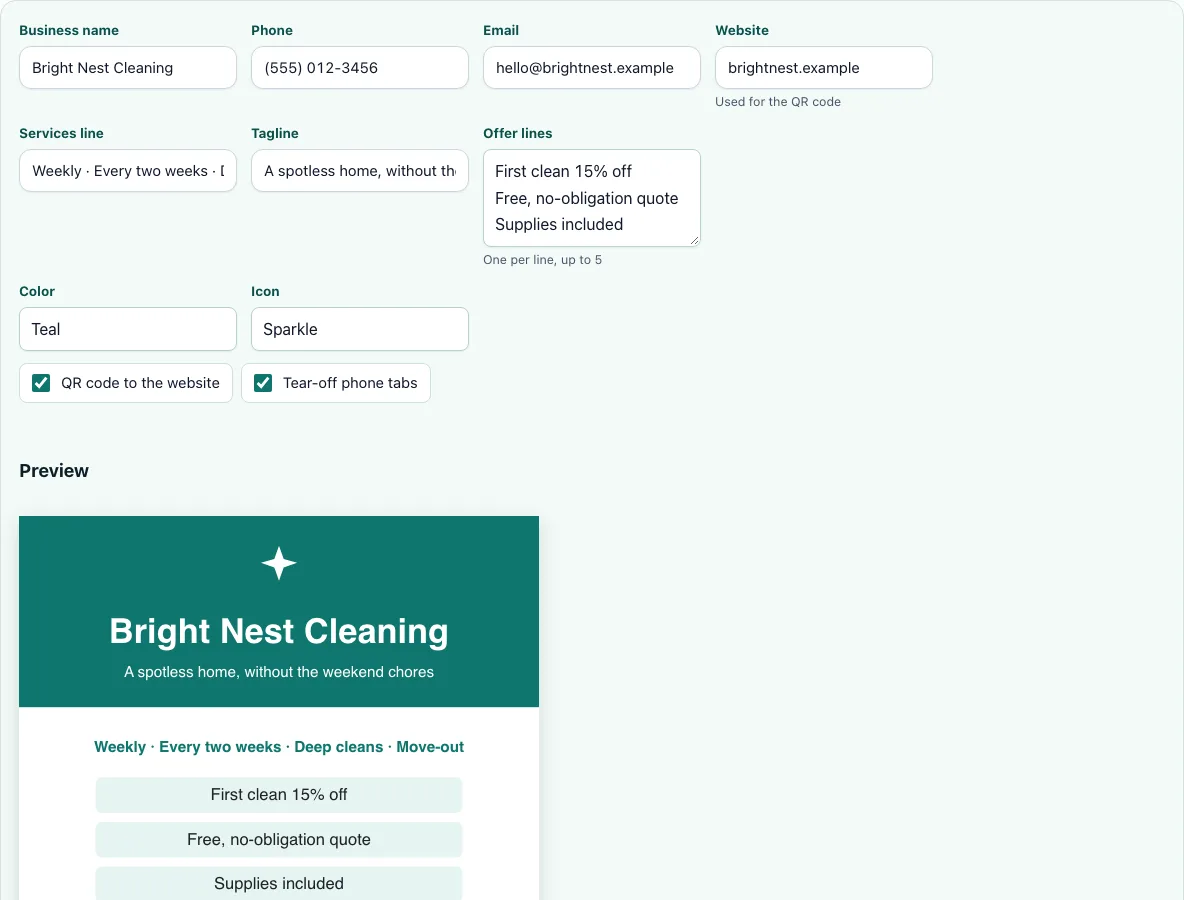
How to use the cleaning flyer template
- Type your Business name and Phone number. Add an Email if you want clients to write to you.
- Enter your Website address. This field also feeds the QR code.
- Describe what you do in the Services line, for example “Weekly house cleaning and move-out cleaning.”
- Write a short Tagline that says why someone should call you.
- Add up to five offers in Offer lines, one per line, such as “First deep clean 20% off.”
- Choose a Color and an Icon.
- Tick QR code to the website if you want the code on the flyer.
- Tick Tear-off phone tabs if you want tabs along the bottom.
- Check the preview. It updates as you type, so you can adjust any line until it reads well.
- Click Print flyer or Download SVG.
When you print, set the scale to 100% so the flyer keeps its size. If you turned on tear-off tabs, the bottom of the page has 8 vertical tabs, each showing your business name and phone. Cut along the dashed lines to separate them.
The Print flyer button prints one page, and Download SVG saves the same design as a file. Check the phone number before you print, because every tear-off tab repeats it. Read the offer lines in the preview at the size they will print, and shorten any line that wraps awkwardly.
What should a cleaning flyer say?
A cleaning flyer should say who you are, how to reach you, and what you clean. Include your business name, a phone number, and a short services line. A clear offer or a one-line tagline gives people a reason to call now rather than later.
Keep the wording short. A reader often sees a flyer only briefly, so the name, the phone number and the service should be readable at a glance. The offer lines are the place for detail, such as a first-visit discount.
How do I make a cleaning flyer for free?
Open the cleaning flyer template in your browser, fill in the fields, and print or download the result. There is no account to create and no charge for the design. Because your details stay in your browser, you can return and edit the same information the next time you need a flyer.
Use the Download SVG button if you want the flyer as a file to send to a printer, then print it at 100% scale from your own machine.
What are tear-off tabs?
Tear-off tabs are narrow strips at the bottom of the flyer, each with your business name and phone number. A person who is interested can cut one off and keep it. This keeps your contact details with them after they leave the board or counter where they found the flyer.
The tool places 8 vertical tabs along the bottom. Cut along the dashed lines with scissors so each tab stays whole.
Where should I put cleaning flyers?
Good places include community boards, laundromats, and coffee shops, as long as the owner or manager agrees. Ask permission before you post anything. Check local rules before you put flyers on doors or in other places. In the US, it is illegal to put flyers in mailboxes, so do not use them.
Post in places near the homes or offices you serve, such as a board in a neighborhood where you already have clients. A flyer far from your jobs reaches people you cannot easily serve.
Can I add a QR code?
Yes. Enter your web address in the Website field and tick QR code to the website. The code is created in your browser with the open-source qrcode-generator library, which is released under the MIT license. Someone who scans it goes straight to your site, which helps people who prefer to look you up on their phone.
Frequently asked questions
Is the cleaning flyer template free to use?
Yes. The tool is free and does not require sign-up, so you can try different offers, colors and icons before you print. Nothing is charged for the design itself.
Is my information sent to a server?
No. Your details are kept in your browser only, and nothing is uploaded. The QR code is also made in your browser from the website address you type, so that address stays on your device.
What paper size does the flyer print on?
Each flyer prints as one US Letter page. Set the print scale to 100% so the size stays correct, and load Letter paper in the printer so the page is not scaled to fit another size.
Can I add my logo to the flyer?
Logo support is coming soon. It is not available yet, so for now the flyer uses the icon options and your business name. Choose a Color and an Icon to give the page its look.
How many offers can I list?
Up to five. Type each offer on its own line in the Offer lines box, and the preview shows each one as the flyer updates. Keep each offer short so it fits the page. The preview shows the offers in the order you type them, so reorder the lines to put your strongest offer first.
Can I download the flyer as a file?
Yes. Select Download SVG to save the flyer as an SVG file. Use it when a printer or designer needs the artwork in a file rather than a printout, and keep a copy of the file for later changes.
Related tools
- Cleaning business card: Use this when you need a small card to hand out in person alongside your flyers.
- Cleaning business names: Use this when you are still choosing a name to put on your flyer.
- How to start a cleaning business: Use this when you are planning the basics before you advertise.
- Cleaning services price list: Use this when you want to list specific services and prices for clients.
- How much to charge for house cleaning: Use this when you are deciding what to put in your offers.
- Cleaning estimate template: Use this when a client asks for a written quote after they call.