
Cleaning Schedule
A cleaning schedule is a list of tasks, each with the day or visit it falls on and the minutes it takes. Minutes are estimates for a medium room.
Free · runs in your browser · nothing is uploaded
Recent
Your last 10 settings, saved only in this browser. Nothing is uploaded.
This tool builds a house cleaning schedule in your browser, and you can use the result as a cleaning schedule template. Choose Home, Office or commercial, or Airbnb and short-term rental, then pick how many cleaning visits you make each week, from 1 to 7.
Tick the rooms, set the bedroom, bathroom and restroom counts, and choose which task types to include. Weekly jobs land on one day and monthly jobs in one week of the month, balanced by minutes. Print the sheet, copy the link, or add a client name and sign-off lines. Nothing you type leaves your browser, and the minutes are estimates for a medium room, so adjust them to your own pace.
Next, see how long a full job takes with the cleaning time calculator, or hand the crew a cleaning work order.
At a glance
A cleaning schedule is a list of tasks, with a day or visit for each one. It answers what to clean, where, how often, and how long it takes.
- Cleaning visits per week can be set from 1 to 7.
- Weekly jobs land on one day, and monthly jobs fall in one week of the month.
- The minutes are estimates for a medium room, not measured times.
- The home example with three visits a week has 63 tasks, with 56 minutes of every-visit tasks.
- The schedule is built in your browser and saved in this browser only.
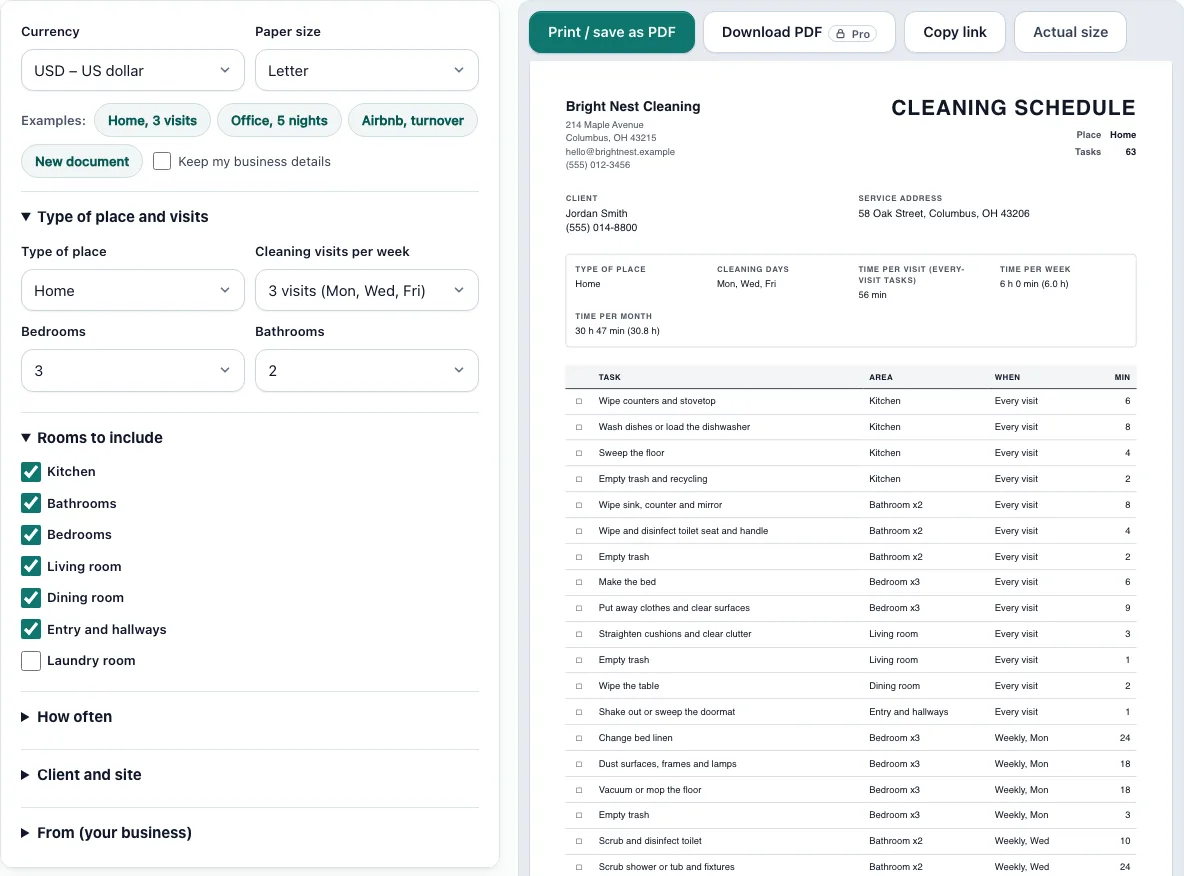
How to use the cleaning schedule maker
- Pick the property type: Home, Office or commercial, or Airbnb and short-term rental.
- Set the cleaning visits per week, from 1 to 7.
- Tick the rooms you clean and enter the bedroom, bathroom and restroom counts.
- Choose the task types to include: every visit, weekly, monthly, every 3 months, and every turnover for rentals.
- Add your own tasks for anything specific to the client or the building.
- Check the table. Each row has a checkbox, task, area, when and minutes, and the totals show time per visit, per week and per month.
- Add the client name, address, notes and sign-off lines, then print the schedule or copy the link.
- Change a room count or the visits per week and the table updates at once, so you can compare a lighter plan with a fuller one before you hand the sheet to the client or the crew.
- If the weekly hours look too long for the visits you can fit, drop a task type or move a room to another visit, then print the schedule again.
- Keep the printed sheet where the cleaner can see it, and tick each box as the job is done, so the client can check at a glance what was cleaned on which visit.
- Review the plan every few months. Rooms change, clients add jobs, and the minutes drift, so update the counts and print a fresh copy when they do.
What goes on a cleaning schedule?
A cleaning schedule is a list of tasks, with a day or visit for each one. A useful schedule answers four questions for every task: what to clean, where, how often, and how long it takes. The table in this tool uses those four columns plus a checkbox, so a cleaner can tick off each job during the visit.
Most schedules group tasks by how often they happen: every visit, weekly, monthly and every three months. The minutes column is an estimate for a medium room, not a measured time. Use it to compare plans and to see whether a visit fits the hours you have.
How often should each room be cleaned?
Frequency depends on how many people use a room and what touches it.
Daily or every visit: kitchen counters, sinks, trash cans, and bathroom basins and toilets.
Weekly: floors, dusting, mirrors, showers and bathtubs, and beds with fresh linen.
Monthly: inside the refrigerator, the range hood, baseboards, switch plates and door frames.
Seasonal: the inside of the oven, inside cabinets, windows, and rugs and carpets, about every three months.
Weekly cleaning schedule for a home
A weekly cleaning schedule for home use spreads the work across the visits you make. With two visits a week, put bathrooms and floors on one day and kitchen detail and dusting on the other, so no single visit runs long.
In the home example with two visits a week, the tool puts the weekly bedroom, living room and entry jobs on Monday and the kitchen, bathroom and dining room jobs on Thursday, so each day carries about the same minutes.
House cleaning schedule: daily, weekly, monthly
A house cleaning schedule with daily, weekly and monthly jobs puts each task in the slot where it belongs. Every-visit jobs repeat on every visit, which makes them the daily list when you visit daily. Weekly jobs land on one day, and monthly jobs fall in one week of the month. The table the tool builds is a house cleaning schedule template you can print, tick and hand to a client, a crew or the rest of the household.
What is the best cleaning schedule for a home?
The best cleaning schedule is the one that fits the visits you can actually make. If a visit runs long, drop a task type or add a visit and compare the totals before you commit.
Office cleaning schedule
An office cleaning schedule usually runs every visit for shared areas, with weekly and monthly jobs for deeper work. Choose Office or commercial in the tool, then enter the restroom count and the rooms you clean.
Every visit: empty trash cans, wipe desks and kitchen surfaces, vacuum walkways, clean restrooms and refill supplies. Weekly: mop hard floors, vacuum under desks, dust and clean out the refrigerator. Monthly: wipe baseboards, dust vents and descale the coffee maker. Add your own tasks for the client’s needs.
How long does a cleaning schedule take?
The time shown is the sum of the minutes for each task, reported per visit, per week and per month.
The minutes are our estimates for a medium room, not measured times. A large room, a dirty kitchen or a home with pets will take longer. Time one real visit and compare it with the totals, then adjust the plan.
For example, the home example with three visits a week has 63 tasks: 56 minutes of every-visit tasks, 6 hours a week and about 31 hours a month once weekly, monthly and every-3-month jobs are added.
If you want to estimate hours for a full job, use the cleaning time calculator.
| Item | Value |
|---|---|
| Cleaning visits per week | 1 to 7 |
| Tasks, home example with 3 visits a week | 63 |
| Every-visit minutes, home example | 56 |
| Weekly hours, home example | 6 |
| Monthly hours, home example | about 31 |
Frequently asked questions
What is a cleaning schedule?
A cleaning schedule is a list of cleaning tasks, each with the day or visit it falls on and how long it takes. It keeps a home, office or rental cleaned on a set rhythm instead of from memory.
What should be on a daily cleaning schedule?
A daily cleaning schedule, or every-visit list, usually covers kitchen counters, sinks, trash cans, bathroom basins and toilets. These are the surfaces that get dirty fastest. Add any task your client asks for on every visit.
How do I make a weekly cleaning schedule?
Open the tool, pick the property type, and set your visits per week. Tick the rooms, then include the weekly task type. The tool places each weekly job on one day and shows the minutes per week.
What is a monthly cleaning schedule?
A monthly cleaning schedule holds jobs done once a month, such as the inside of the refrigerator, baseboards, switch plates and door frames. The tool places monthly jobs in one week of the month so they do not all land on one visit.
Can I make an office cleaning schedule or an Airbnb cleaning schedule?
Yes. Choose Office or commercial for an office, or Airbnb and short-term rental for a rental, which also adds a turnover task type. For printable checklists, see the office cleaning checklist and the Airbnb cleaning checklist.
Can I add a logo and send the schedule to a client?
Yes. Adding a logo is free, and the sheet has fields for the client name, address and notes, plus sign-off lines. Print it or copy the link to share. Pro adds a PDF file of the schedule, saved clients with no cap on how many, and removes the “Made with CleanPricer.com” line.
Is what I type uploaded?
No. The schedule is built in your browser and saved in this browser only. Clearing your browser data removes it, so keep a printed or PDF copy of each schedule you give a client.
How do I set up a house cleaning routine?
Treat the schedule as your cleaning routine: choose Home, set how many visits you make each week, and the tool places daily, weekly and monthly jobs for you. For a daily house cleaning schedule, set 7 visits a week; for a weekly house cleaning schedule, set 1. Print the sheet and keep it where the cleaner can see it.
- Office Cleaning Checklist — Tick office cleaning tasks by area and frequency, add your own and print the list
- Airbnb Cleaning Checklist — A room-by-room turnover checklist for short-term rentals that you can tick, edit and print
- Cleaning Time Calculator — Estimate the hours a cleaning job takes
- Cleaning Work Order Template — Write the job sheet your crew carries: where, when, what to do and who signs off
- Cleaning Estimate Template — Fill in the estimate on the left; the finished page updates on the right, ready to print