
Cleaning Service Receipt
Give your client proof of payment, with the method, the date and any balance left.
Free · runs in your browser · nothing is uploaded
Recent
Your last 10 settings, saved only in this browser. Nothing is uploaded.
A cleaning service receipt records a payment you have received. Fill in the form on the left and check the receipt on the right, set to US Letter or A4. It shows who paid, what for, the amount, the date and how it was paid, with a card, check or transfer reference, and the number of the invoice or quote it settles.
If the client paid everything, leave the Amount received box empty and the receipt says “Paid in full”. If they paid part, such as a deposit to hold a date, enter the amount and the receipt shows the balance still due. Everything stays in your browser and nothing is uploaded. Two examples load with one click: a card payment in full and a deposit.
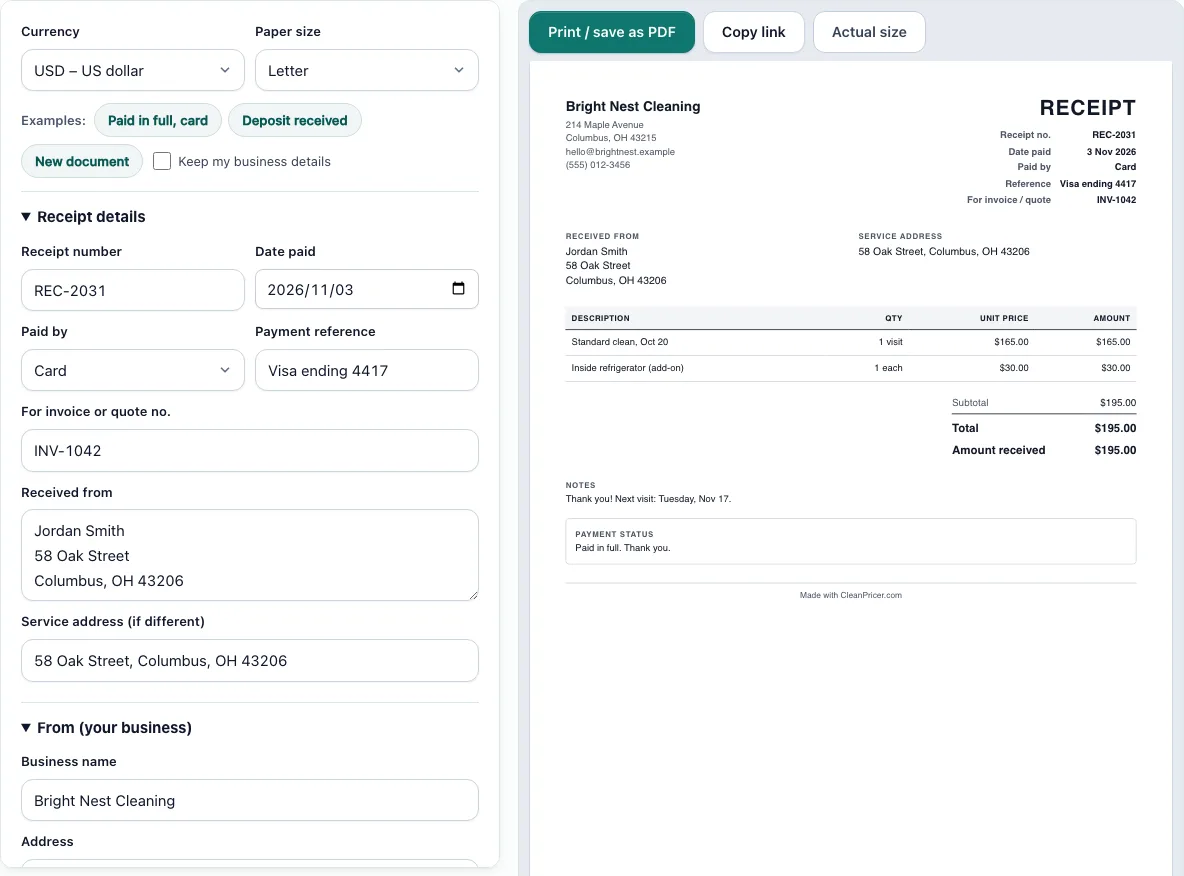
How to use the Cleaning Service Receipt
- Pick Letter or A4 from the paper size control and choose your currency.
- Under Receipt details, enter the receipt number, the date paid and how the client paid. Add the check number, card ending or transaction ID, and the invoice or quote number the payment is for.
- Enter who the payment is received from. Add the service address if the work was done somewhere else.
- Enter your business details. You can add a logo (PNG, JPG or SVG, up to 300 KB).
- Under What was paid for, add one row for each service with a quantity and unit price. Add a discount per row if you gave one.
- Choose tax: none, one rate, or a rate on each row, and a discount on the whole receipt if needed.
- Leave Amount received empty for a payment in full, or enter the smaller amount for a deposit or part payment.
- Read the totals panel, then use “Print / save as PDF”.
Use “Keep my business details” to keep your name and address filled in for the next receipt. Open “How the totals were calculated” to check each line and the tax before you send the receipt to the client.
Choose the currency from the Currency list if you are paid in another one; the amounts and the date format on the paper follow it.
What should a cleaning receipt include?
A cleaning receipt should show your business name and contact details, a receipt number, the date the money arrived and the name of the person who paid. It should list what was paid for, the total and the amount received, and how it was paid. A check number or the last digits of a card let both sides find the payment later.
If you charge sales tax, show the rate and the tax amount as separate lines, as the template does. Add the invoice number so the receipt closes the right invoice.
What is the difference between an invoice and a receipt?
An invoice asks for money. A receipt confirms money was received. You send an invoice before payment, with a due date, and a receipt after, with the date paid. Some clients pay on the spot, in which case the receipt is the only document, and the template works as that single paper.
If you already sent an invoice, give the receipt the same lines and amounts and quote its number. If you have not made the invoice yet, use the cleaning invoice template first.
How do I write a receipt for a deposit?
Fill in the full price of the job in the rows, then enter the deposit in Amount received. The receipt shows the total, the amount received and the balance still due, and its status line says the payment is partial. Add a note that says when the balance is due, such as “when the clean is finished”. When the client pays the rest, make a second receipt, keep the same invoice or quote number, and leave the amount empty so it reads “Paid in full”.
The Deposit example shows this: a $420 move-out clean with $100 received and $320 still due.
Do I have to give a receipt for a cash payment?
Rules differ by state and country, and by whether you are registered for sales tax, so check with your tax office or accountant. As a practice, give a receipt for every cash payment and keep a copy. It protects you if a client says they paid and you need to show how much you were paid, and it gives you the record your bookkeeping needs.
Frequently asked questions
Is this cleaning service receipt free?
Yes. It is free and needs no sign-up. You can make as many receipts as you like and print each one or save it as a PDF.
Is my receipt data uploaded?
No. What you type is saved in this browser only. Clearing your browser data removes it, so keep a PDF copy of each receipt you issue.
Can I add my logo?
Yes. Upload a PNG, JPG or SVG file of up to 300 KB. It stays in this browser and is not uploaded.
Can the receipt show tax?
Yes. Choose one rate for the whole receipt or a different rate on each row. The tax appears as its own line. Which tax applies to cleaning depends on where you work, so enter the rate your tax office gives you.
What if the client paid more than the total?
The page shows a warning. Check the amount you entered. If the client really overpaid, refund the difference or credit it to the next visit and say so in the notes.
Can I use a receipt as an invoice?
No. A receipt records that money came in. If you still need to be paid, send an invoice with a due date.
Related tools
- Cleaning invoice template: Ask for payment before you issue the receipt.
- Cleaning work order template: Give the crew the job sheet.
- Cleaning estimate template: Quote the job and take a deposit.
- Cleaning contract template: Set payment terms for recurring work.
- Cleaning services price list: Publish your prices for clients.
- How much to charge for house cleaning: Check your rates before you invoice.