Cleaning Services Price List
List your services and prices and print a price sheet.
Recent
Your last 10 settings, saved only in this browser. Nothing is uploaded.
This free cleaning services price list tool lets you build a clear, printable price list for your cleaning business in your browser, with no sign-up. Fill in your business details and services, and a live paper preview shows the finished page as you type. Nothing is uploaded, and the document is saved in this browser as you work. A printed list gives clients a written reference for what you charge.
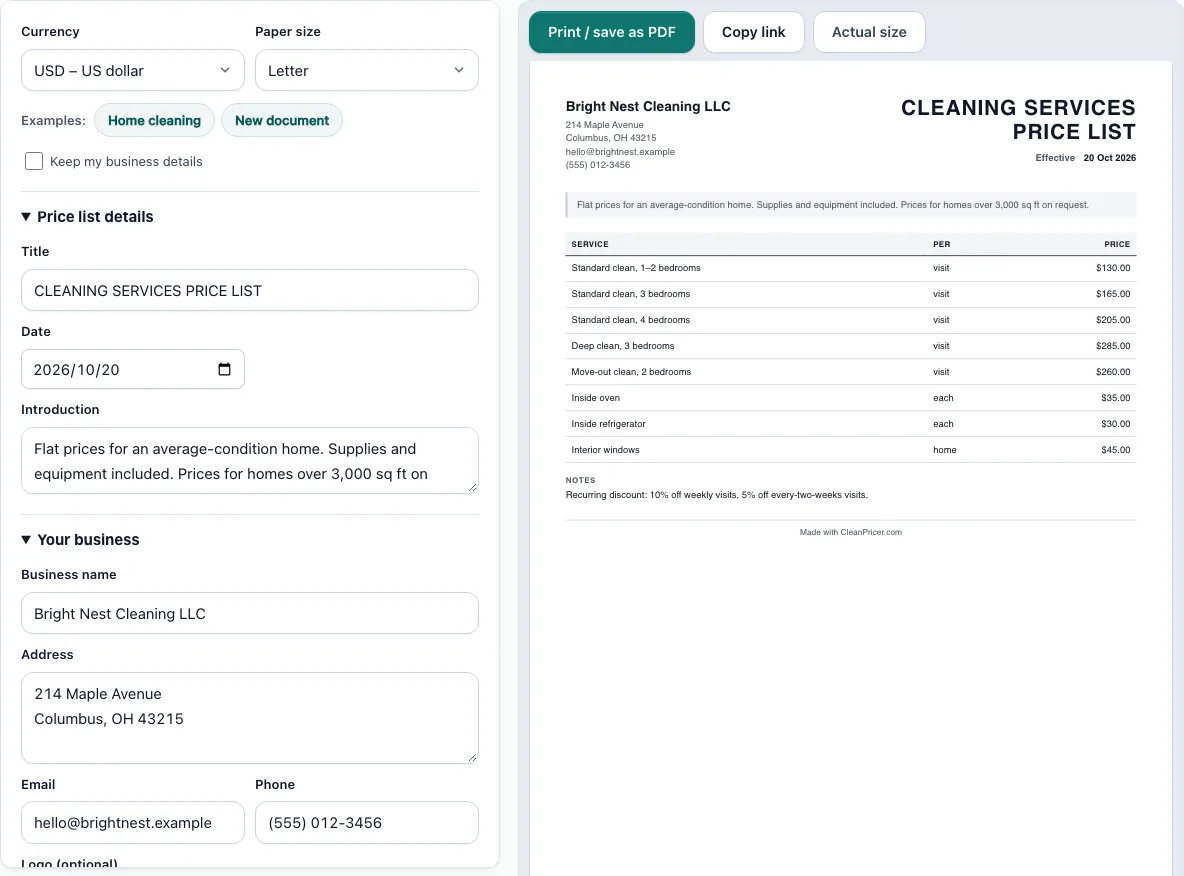
Use it as a cleaning price list template or a house cleaning price list starting point. The example loads standard cleans for different bedroom counts, a deep clean, a move-out clean and a few add-ons, so you can see how a complete list looks before you replace the numbers with your own. You can choose Letter or A4 paper and any of many currencies.
How to use the Cleaning Services Price List Tool
- Click one of the example buttons to load a full sample, or click New document to clear the form and start blank.
- Open the business section on the left and enter your business name and contact details.
- Enter a Title and an effective Date, which is the day your prices start to apply.
- Write a short Introduction for your clients.
- In the services list, add a row for each service with its Service name, Unit and Price. Replace the example prices with yours.
- Write your terms in Notes and discounts, including any recurring discounts.
- Optionally, add a logo as a PNG, JPG or SVG file up to 300 KB.
- Choose Letter or A4 paper and your currency.
- Check the live paper preview on the right as you edit.
Read the preview as your client will see it. Check that every price has a unit next to it, and that the effective date is the one you intend. If you use Keep my business details, check that the business fields are still correct before you print.
Click Print / save as PDF to print only the document, or save it as a PDF. Click Copy link to store the whole document inside a link you can send. The document saves in this browser as you type, so use the same browser to pick up where you left off.
What should be on a cleaning services price list?
A cleaning services price list should show each service you offer, the unit each price applies to, and the price itself. It also needs a title, an effective date, a short introduction, your business details, and notes on discounts and terms.
Name each service in plain words so clients know what they are buying. The unit matters as much as the price: a standard clean for 1–2 bedrooms at $130 means something different from an oven clean at $35 per oven.
Should I publish my cleaning prices?
Yes, if your prices are fairly standard, because a clear list answers the first question most people have. If your jobs vary widely in size or condition, publish starting prices and state that the final quote depends on the home.
Always set the effective date when you change prices. That way, clients can tell which version of the list applies to them.
How do I price add-on services?
List add-ons as separate rows with their own prices, so clients can choose them on top of a base clean. The example does this with inside oven at $35, inside refrigerator at $30 and interior windows at $45.
For example, a 3-bedroom standard clean at $165, with an inside oven at $35 and an inside refrigerator at $30, comes to $230 before any discount. Price each add-on for the extra time and supplies it takes, and keep the unit specific, such as per oven or per refrigerator.
How do I show recurring discounts?
Put recurring discounts in the Notes and discounts section as a plain rule that states who qualifies, how much the discount is, and how often it applies. The example includes a note about recurring discounts that you can adapt.
Say whether the discount applies to every visit or only to the base price, so clients do not have to guess. A discount written as a percentage is clearer when the rule also states which services it covers.
Can I print my price list?
Yes. Choose Letter or A4 to match your printer’s paper, then click Print / save as PDF, which prints just the document. Check the preview first so the layout looks right before you print.
If you want a file instead of paper, use the same button and save as PDF. The file holds the document as laid out in the preview.
Frequently asked questions
Is this cleaning price list template free to use?
Yes. It is free and needs no sign-up. Your document is saved in your browser as you type, and nothing is uploaded.
Are the prices in the example real?
No. The example prices are placeholders to replace with your own. The pricing calculator on this site can help you set them.
Can I share my price list with clients online?
Yes. Click Copy link to store the whole document inside a link, then send that link to a client. Anyone with the link sees the document as it was when you copied it. If you change a price later, copy the link again and send the new one.
Can I keep my business details for the next list?
Yes. Click Keep my business details when you start a new document, and your business fields stay filled in while the rest of the form clears.
Can I change the currency?
Yes. The Currency select offers many currencies, and the preview shows the prices in the currency you choose. Pick the currency before you enter prices so the figures are easy to check. Look at the preview again after you switch, so the currency on every price is the one you meant.
Can I add my logo?
Yes, optionally. A logo can be a PNG, JPG or SVG file up to 300 KB. The logo is kept in this browser only. A note on the page says a logo without the footer line is coming soon, so the printed page keeps its footer for now.
Related tools
- How much to charge for house cleaning: Use it when you are deciding what your base prices should be.
- Cleaning estimate template: Use it when a client wants a quote for a specific job before booking.
- Cleaning invoice template: Use it to bill a client after a job is complete.
- Cleaning business card: Use it to share your contact details and services in person.
- House cleaning estimate calculator: Use it to work out an estimate from the details of a home.
- How to start a cleaning business: Use it if you are setting up your business and need the basic steps.