
Cleaning Work Order Template
Write the job sheet your crew carries: where, when, what to do and who signs off.
Free · runs in your browser · nothing is uploaded
Recent
Your last 10 settings, saved only in this browser. Nothing is uploaded.
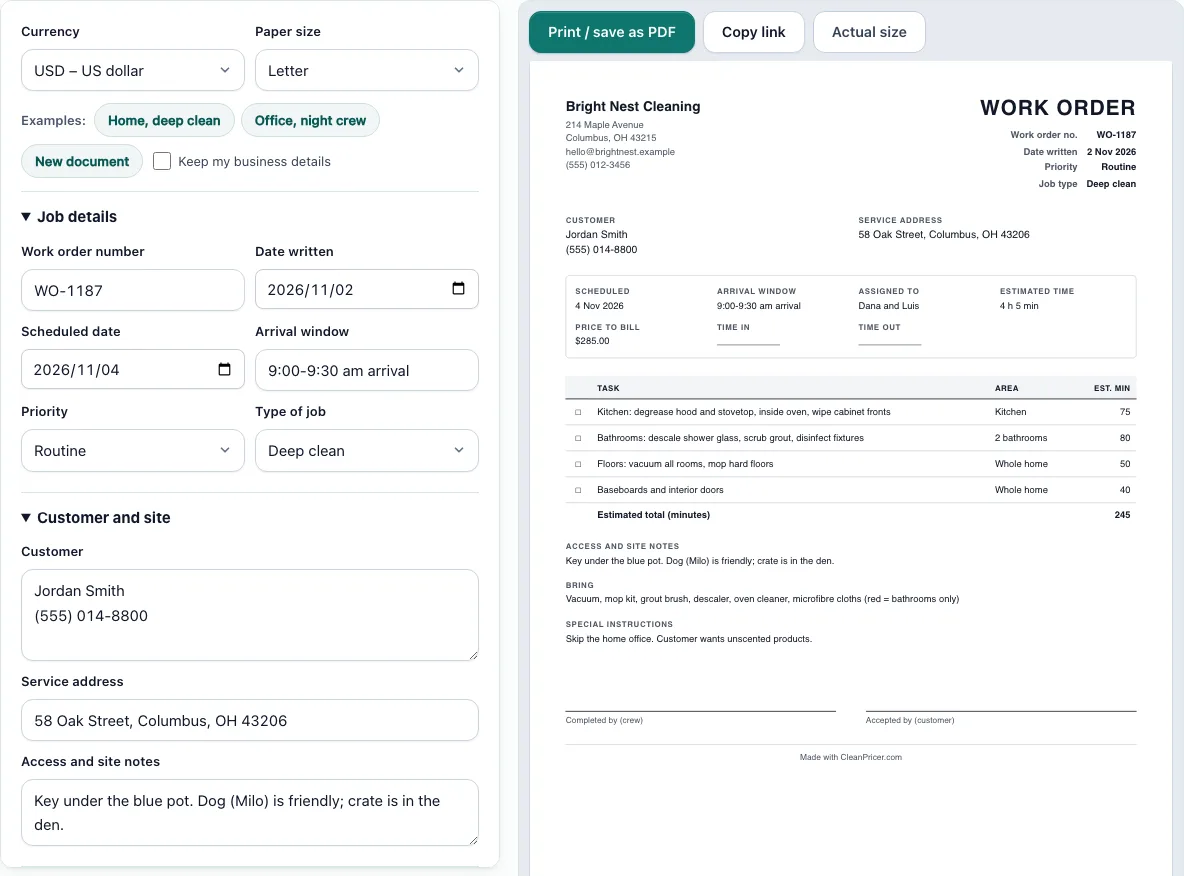
A cleaning work order template builds the one-page job sheet a cleaning crew carries to a site. Fill in the form on the left and watch the sheet on the right update, set to US Letter or A4. It lists the customer and address, the day and arrival window, a checkbox list of tasks with the minutes you expect each to take, the supplies to bring, any special instructions and, if you want them, time in and time out lines with two signature lines.
The work order is for the crew, not for the customer’s accounts department, so the price is optional and you can leave it off. Everything stays in your browser. Two examples, a home deep clean and an office night shift, load with one click.
How to use the Cleaning Work Order Template
- Pick Letter or A4 from the paper size control.
- Under Job details, enter the work order number, the date you wrote it, the scheduled date and the arrival window. Choose Routine or Urgent and the type of job.
- Under Customer and site, enter the customer, the service address and any access or site notes, such as where the key is or that a dog is in the house.
- Under Tasks, add one row per task. Write what the crew must do, the area it applies to and the minutes you expect. Use the arrows to put the rows in the order the crew will work.
- Under Crew, supplies and sign-off, add who is assigned, what to bring and any special instructions. Enter a price only if the crew should see it.
- Tick “Add time in/out and sign-off lines” if you want the crew and the customer to sign when the work is done.
- Check the Estimated time in the totals panel, then use “Print / save as PDF”.
Use “Keep my business details” when you start the next work order so your name and address stay filled in. The page also keeps your last sheet in this browser, so you can reopen it tomorrow and change only the date.
Sections after the first two start closed, so open Tasks, Crew, supplies and sign-off, or your business details when you need them.
What is a cleaning work order?
A cleaning work order is a written instruction for one job: this crew, at this address, on this day, does these tasks. It is the sheet the crew works from. It is different from a quote, which the customer sees before the job, and from an invoice, which asks for payment after it.
For a recurring home, one work order can describe the standard visit and be reused each time with a new date. For a one-off deep clean, move-out or post-construction job, a fresh sheet lists exactly what was agreed so the crew does not have to guess.
What should a cleaning work order include?
A useful work order covers six things. The customer and the service address, so the crew goes to the right place. The scheduled date and the arrival window. The tasks, ideally one line each, so each can be ticked off. The area each task applies to, because “bathrooms” and “2 bathrooms” are different jobs. Site notes such as access, parking, pets and rooms to skip. And the supplies and equipment to bring.
The template adds an estimated minutes column and adds it up for you. If you time a few real jobs, those figures turn the work order into a check on your quote: when the estimate on the sheet is far below the hours you priced, find out why before the day.
What is the difference between a work order and an invoice?
A work order says what will be done. An invoice says what is owed. The work order usually has no price, or only an amount for the office, and it is written before the job. The invoice lists what was done and what it costs and is sent after. If you keep the work order number on the invoice, a customer or an accountant can match the two.
When you are ready to bill, the cleaning invoice template takes the same service lines, and the cleaning service receipt records the payment once it arrives.
Who should sign a cleaning work order?
Signatures are optional but they settle arguments. The crew lead signs to say the listed tasks were done. The customer, or a site contact in an office, signs to say the work was accepted or notes what was missed. If nobody is on site, have the crew photograph the signed sheet or write the arrival and departure times and leave the customer line empty.
A work order is a working record, not a contract. If you need terms about payment, cancellation and liability, use the cleaning contract template once, and let the work orders refer to it.
Frequently asked questions
Is this cleaning work order template free?
Yes. It is free, needs no account and has no limit on how many sheets you make. Print each one or save it as a PDF from the print window.
Is the information I type uploaded?
No. The form is saved in this browser only, so clearing your browser data removes it. Keep a PDF copy of each work order you issue.
Should I put the alarm code on the work order?
It is safer not to. A printed sheet can be left in a van or a building. Write where the code is kept or who gives it to the crew, and tell the crew lead the code another way.
Can I use the work order for an office or commercial job?
Yes. Choose Commercial / janitorial as the job type, list the tasks by area, and use the arrival window for the hours the building is open. The office example shows a night-shift sheet.
Can I leave out the price?
Yes. The price is optional. If you leave it empty the sheet shows no price line, so the crew sees only the job and the times.
How are the estimated minutes used?
The sheet adds the minutes you enter for each task and shows the total in hours and minutes. It does not change any price. Use it to compare against the hours you quoted.
Related tools
- Cleaning invoice template: Bill the customer for the finished job.
- Cleaning service receipt: Record the payment and show any balance left.
- Cleaning estimate template: Quote the job before the work order is written.
- Cleaning time calculator: Check how many cleaner-hours a home or space should take.
- Airbnb cleaning checklist: A printable room-by-room list for turnovers.
- Office cleaning checklist: Task lists to copy into the work order for commercial jobs.