Dental Office Cleaning Checklist
Janitorial cleaning tasks for a dental office by area and frequency, ready to print.
Recent
Your last 10 settings, saved only in this browser. Nothing is uploaded.
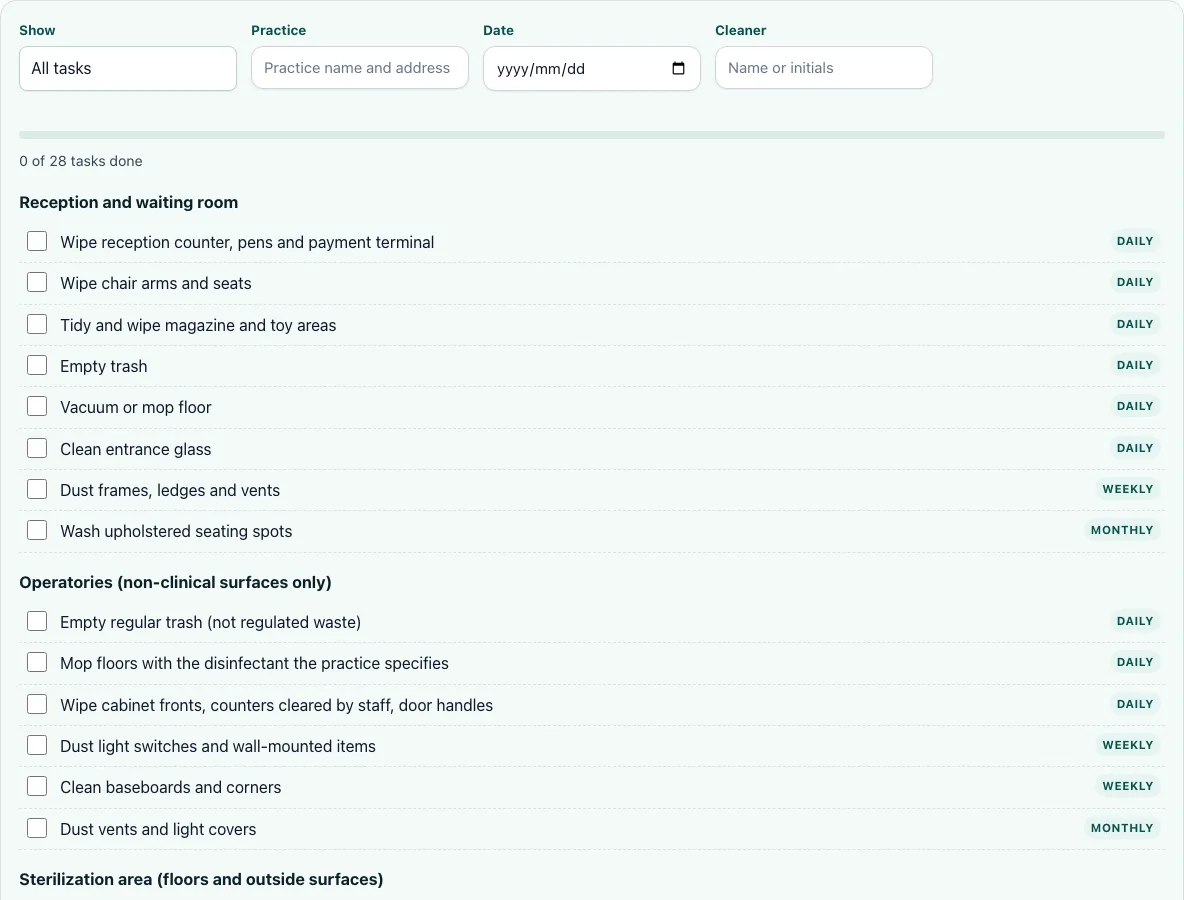
The Dental Office Cleaning Checklist is a free, browser-based list of 28 janitorial cleaning tasks for a dental office. You tick each task as it is done, and a progress bar counts the ticks. It runs in your browser, needs no account or sign-up, and works on phones.
The checklist covers the non-clinical side of the office: reception and the waiting room, operatory surfaces outside the clinical area, the sterilization area’s floors and outside surfaces, restrooms, and staff areas. It is a janitorial list, not a clinical one. It is meant to be used alongside the practice’s own infection-control program, which handles clinical surfaces, instruments and regulated waste. Use it as a daily or scheduled record, and print it when you need a paper copy. It is a free tool, so there is no cost to try it on one visit before you decide how to use it.
How to use the Dental Office Cleaning Checklist
- Choose a frequency in the Show filter to see only the tasks due at that interval, or leave it on all tasks.
- Enter the property name in the site/property field so the printed header identifies the office.
- Set the Date to the day the cleaning is done.
- Type the cleaner’s name or initials in the Cleaner field.
- Work through the sections and tick the checkbox beside each task as you finish it. The progress bar counts the ticked tasks.
- To add a task specific to your office, select Add your own task, then enter the task, its Section, and How often.
- Select Print when you need a paper copy. The printout shows blank boxes for the tasks and the filled-in header, so staff can tick by hand.
- Select Clear ticks to reset the checkboxes before the next cleaning.
Read the progress bar as a quick check, not proof that the job is complete. It counts only the boxes ticked on screen, so a printed sheet filled in by hand will not move the bar.
Your ticks and custom tasks are saved in your browser only, and nothing is uploaded. Because the data stays on the device you are using, a checklist saved on one computer will not appear on another.
What should be cleaned daily in a dental office?
Each task on the checklist has a frequency, and the Show filter lets you view the tasks for one interval at a time. Filter to the interval you want, then work through the sections in order. The checklist groups its 28 tasks into five sections: reception and waiting room (8), operatories, non-clinical surfaces only (6), sterilization area, floors and outside surfaces (3), restrooms (6), and staff areas (5).
Reception, restrooms and staff areas hold 19 of the 28 tasks, so most of the routine work sits there. The operatory and sterilization sections are narrower, since their clinical side is outside the checklist.
Who cleans the dental operatory?
The operatory is split between two responsibilities. Clinical surfaces, instruments, sterilization and regulated waste belong to the dental practice and fall under its infection-control program, which follows CDC guidance for dental settings. The janitorial cleaner covers the non-clinical surfaces in the operatory, such as cabinet fronts and the floor. This split is why the checklist’s operatory section is labelled “non-clinical surfaces only.”
The operatory section has 6 tasks. Those six cover the parts of the room a janitorial cleaner can clean, and the checklist does not ask the cleaner to touch clinical equipment.
Can a janitorial company clean a dental office?
Yes, a janitorial company can clean the environmental areas of a dental office. That includes floors, regular trash, cabinet fronts, restrooms, reception, and staff areas. The company should not be expected to handle clinical work. Before hiring, agree in writing on which areas are included and which stay with the practice.
When you ask a cleaner for a quote, ask which of the 28 checklist tasks are included. Ask whether regular trash is included, and confirm that regulated waste is handled by the practice, not the cleaner.
What is not included in janitorial cleaning?
Janitorial cleaning does not include clinical surfaces, instruments, sterilization, or regulated waste. These remain the practice’s responsibility under its infection-control program. If a task on your list relates to any of these, it should be handled by dental staff following the practice’s own procedures, not by the janitorial cleaner.
Regular trash is the exception that often causes confusion. The checklist lists regular trash, not regulated waste, so the cleaner handles ordinary bins while the practice keeps regulated waste under its own process.
Frequently asked questions
How do I print the dental office cleaning checklist?
Select Print on the page. The printout includes the filled-in header, including the date, cleaner and property, and blank boxes for each task so the list can be ticked by hand on paper.
Is the dental office cleaning checklist free to use?
Yes. The tool is free, runs in your browser, and needs no account or sign-up. It also works on phones.
Are my ticks saved if I close the page?
Ticks and custom tasks are saved in the browser you are using, and nothing is uploaded. They stay on that device and browser, so use the same browser to pick up where you left off. Select Clear ticks to reset them before the next cleaning, because the ticks from the last visit stay until you clear them.
Can I add tasks that are not on the list?
Yes. Select Add your own task, then enter the task, choose its Section, and set How often. Your added tasks are saved in the browser with your ticks. Each task you add needs a Section, so it appears under the right heading on the list and on the printout.
Can I share the checklist with my cleaners?
Not yet. Sharing a checklist with cleaners is coming soon. For now, print the checklist and give the paper copy to the cleaner, or read the tasks out before the visit.
Can I keep one list for each office?
Not yet. One list per property is coming soon. Until then, enter the property name in the site/property field before you print, so each printout is labelled for its office. Printing one sheet per office is a simple way to keep the records separate.
Related tools
- Office cleaning checklist: Use this when you need a general checklist for an office that is not a dental practice.
- Commercial cleaning cost calculator: Use this to estimate what a commercial cleaning job might cost before you quote it.
- Janitorial bid calculator: Use this to work out a bid for a janitorial contract.
- Cleaning contract template: Use this to draft a contract that sets out which areas a cleaner covers.
- Cleaning proposal template: Use this to write a proposal for a cleaning client.
- Cleaning bid calculator: Use this to price a cleaning job when you are preparing a bid.