House Cleaning Estimate Calculator
Quote a home at your own hourly rate and print an itemized estimate for the client.
Recent
Your last 10 settings, saved only in this browser. Nothing is uploaded.
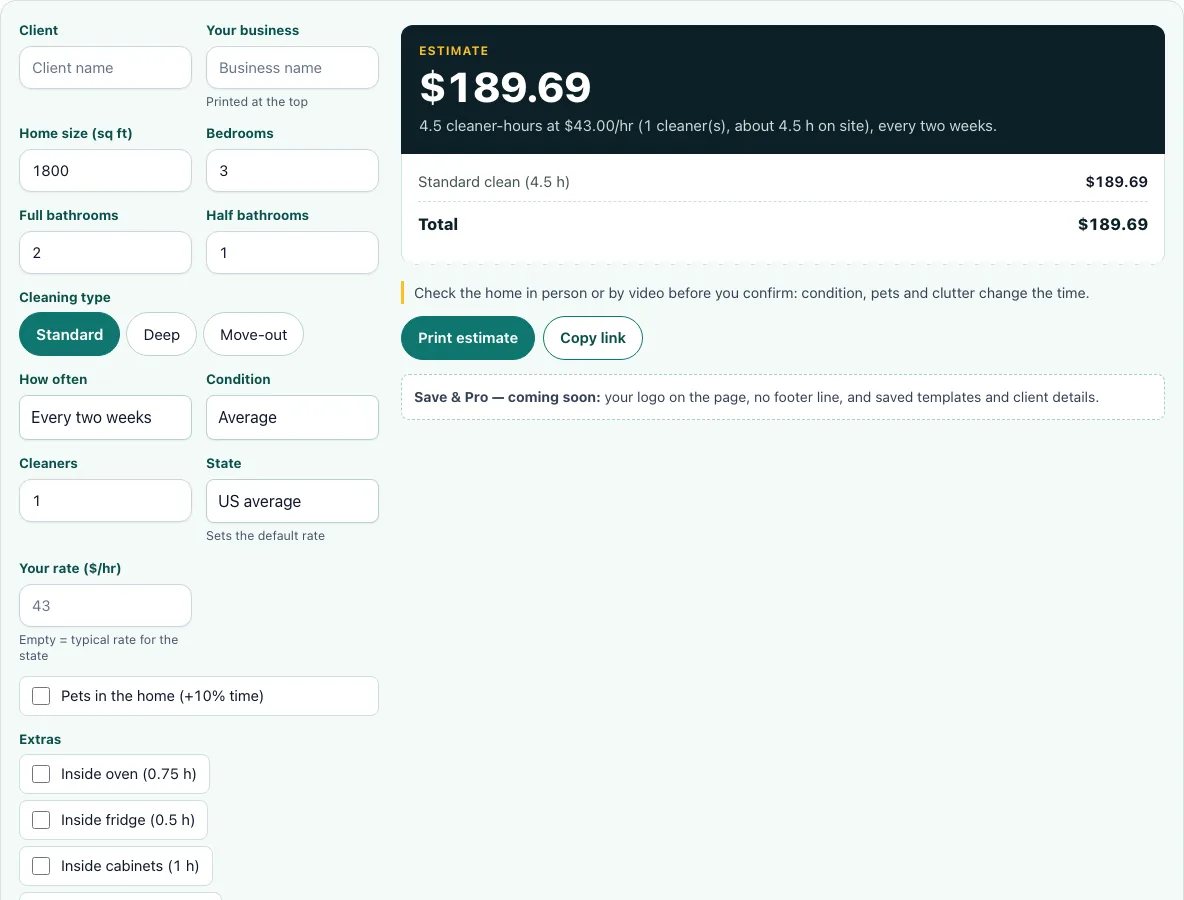
How to use the House cleaning estimate calculator
- Enter the Client name and Your business name so they appear on the printed estimate.
- Set the Home size in square feet, then the number of Bedrooms and Full and Half bathrooms.
- Choose the Cleaning type (standard, deep or move-out).
- Choose How often the client wants service.
- Pick the Condition of the home and the number of Cleaners on the job.
- Select the State. This sets the default rate.
- Enter Your rate ($/hr). Leave it empty to use the typical rate for the state.
- Set the Pets box if it applies to the home.
- Tick any Extras from the list. For an item that is not listed, use Add an extra item and enter your own price.
- Set the Minimum charge ($), Discount (%) and Sales tax (%), then read the total box and the itemised receipt.
Read the total box first. It shows the cleaner-hours and the time on site, which tell you how long the job takes.
Your settings stay in the page address, so the Copy link button shares or bookmarks the exact estimate. The Print estimate button prints the result with your business name, client name and date. The page works on phones, and wide tables scroll sideways inside their box.
How do cleaners estimate a house cleaning job?
Cleaners estimate the hours a job will take, then multiply those hours by an hourly rate. This tool’s standard-clean model starts with 1.5 hours per visit and adds 0.0008 hours per square foot, 0.25 hours per bedroom, 0.6 hours per full bathroom and 0.3 hours per half bathroom. A deep clean takes 1.31 times that time, and a move-out clean takes 1.40 times. Recurring visits are shorter: 80% of a first clean for weekly, 85% for every two weeks and 90% for monthly. Light condition is 90% of the time, and heavy condition is 125%.
For the default home, the standard time is 5.19 hours: 1.5, plus 1.44 for 1,800 sq ft, plus 0.75 for three bedrooms, plus 1.2 for two full bathrooms, plus 0.3 for one half bathroom. Every-two-weeks visits take 85% of that, which gives 4.41 cleaner-hours. At the $43 typical rate the total is $189.69, well above the $120 minimum.
How do I write a house cleaning estimate?
Start with the client’s name, the date and the scope of work. Then list each part of the price: the cleaning itself, each extra, any of your own items, and any adjustments. Itemising makes it clear what the client is paying for. The tool’s receipt does this for you, and each line is hours multiplied by your rate. A company rate of $36 to $48 per cleaner-hour (US average) gives a typical range. This tool’s company rate for each state is the BLS cleaner wage multiplied by 2.5, which is our assumption for payroll taxes, insurance, travel, supplies and profit.
Should I set a minimum charge?
Yes, if small jobs take less time than the travel and setup they require. Enter an amount in Minimum charge ($), which is $120 in the default example. If the calculated price falls below that amount, the receipt shows a minimum-charge adjustment that brings the total up to the minimum. Choose a figure that covers your travel and setup for a short visit.
How do I price add-ons like ovens and fridges?
Extras are priced by time: each extra’s hours multiplied by your rate. The Extras list uses the same hours as the cost calculator, so check whether the item you need is on it. If it is not, select Add an extra item and enter your own price. For your own items, price the time and supplies you expect to use, so they match the rest of the estimate.
Do I charge sales tax on cleaning?
It depends on your state, because some states tax cleaning services and many do not. Enter a rate in Sales tax (%) only if your state taxes the service. The receipt shows tax after the discount line. Check your state revenue department to confirm the rule and the rate before you add tax to a client’s estimate.
Frequently asked questions
Is the house cleaning estimate accurate?
The tool gives an estimate based on a model of cleaning time, so real jobs can take more or less time. Adjust the Condition setting and your rate to fit the home you are quoting. Walking through the home before you finalise the quote helps you check the result.
Can I use this calculator for deep cleans and move-outs?
Yes. Choose Deep clean or Move-out in the Cleaning type control, and the tool adds the extra time for that type of job. The model uses 1.31 times the standard time for a deep clean and 1.40 times for a move-out, so the total rises when you change the setting.
Can I save my house cleaning estimate?
Not yet. A note under the tool says that saving estimates and branded quotes are coming soon. Until then, use Print estimate to keep a copy, or bookmark the page after you use Copy link.
What rate should I enter if I am not sure?
Leave Your rate ($/hr) empty to use the typical rate for the state you select. You can compare that figure with the $36 to $48 per cleaner-hour range before you send the quote. A rate you enter yourself replaces the state default.
Does the tool send the estimate or book the cleaners?
No. The tool does not send the estimate to your client or book a cleaner. Print the estimate, or copy the link, and send it yourself.
Does the discount come before the tax?
The receipt lists the discount before the sales tax line, so the discount reduces the amount that tax is added to. Enter the discount as a percentage in Discount (%) and check the receipt for the result.
Related tools
- How much to charge for house cleaning: Read this when you want to decide your rate before you use the calculator.
- Cleaning estimate template: Use this when you want a ready-made layout for the quote you send to a client.
- Cleaning invoice template: Use this after the job is done and you need to bill the client.
- Cleaning contract template: Use this when a client agrees to recurring service and you want the terms in writing.
- House cleaning cost calculator: Use this to estimate what a client might pay for a cleaning job.
- House cleaning rates per hour: Use this to compare hourly rates before you set your own.