Office Cleaning Checklist
Tick off office cleaning tasks by area and frequency, add your own and print the list.
Recent
Your last 10 settings, saved only in this browser. Nothing is uploaded.
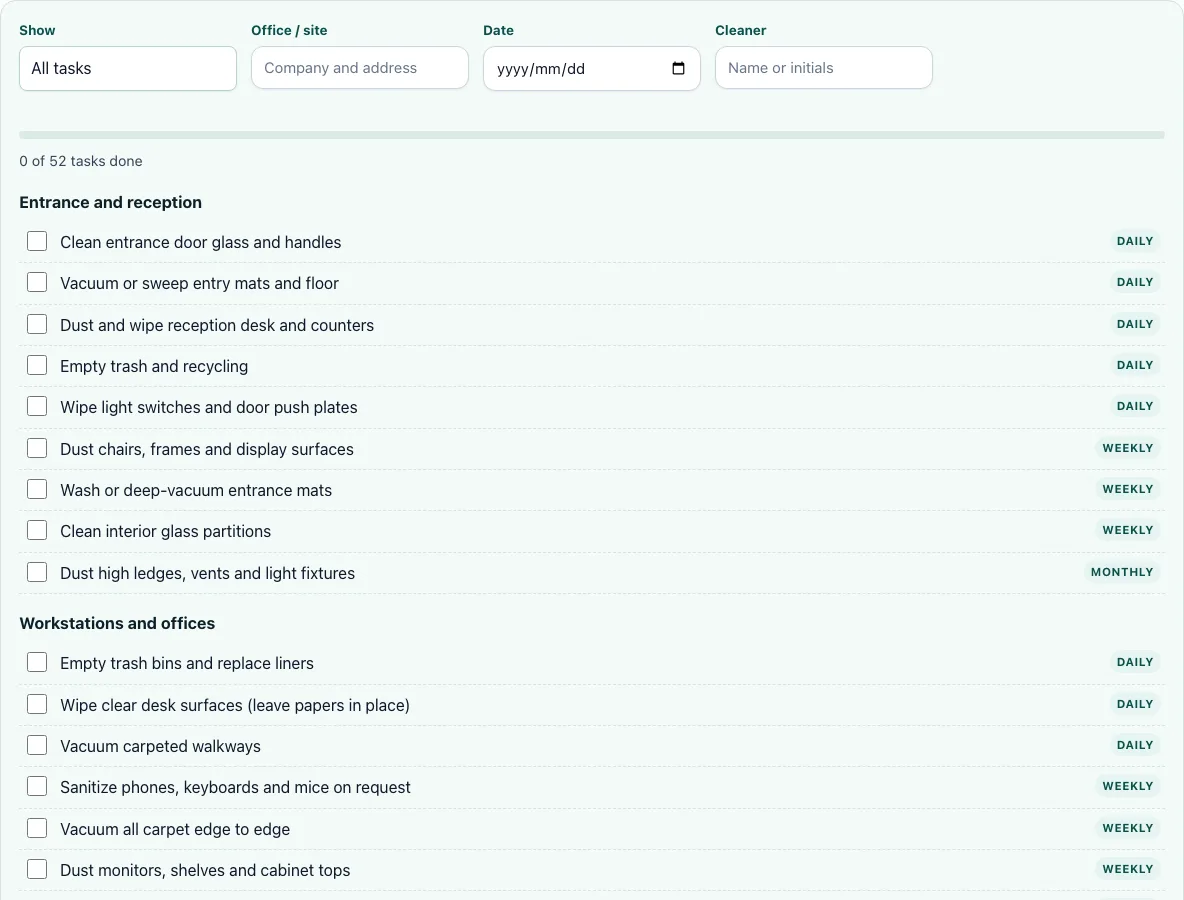
This free office cleaning checklist runs in your web browser. It gives you 52 tasks in six sections, a checkbox for each task, and a progress bar that counts what you have ticked. There is no account or sign-up, and it works on phones as well as computers.
Use it as an office cleaning checklist template for daily, weekly, or monthly work. Filter the list by frequency, record the site, date, and cleaner, then tick each task as you finish it. You can add your own tasks and print a copy with blank boxes for paper use. Office managers can keep the printed sheets as a record of each visit, and cleaning crews can work from the same list every time. Your ticks stay in your browser, so use the same browser for each visit.
How to use the Office cleaning checklist
- Choose a filter in Show: All tasks, Daily, Weekly, or Monthly. Use All tasks for a full visit, or one frequency when you only need that set.
- Type the site or property name in the site field.
- Set the Date of the visit.
- Enter the Cleaner name or initials, so the record shows who did the work.
- Tick each task as you finish it. The progress bar updates with each tick.
- To add a task, select Add your own task, type the task, choose a Section, and set How often.
- Select Print to print the checklist. The printout has blank boxes and your filled-in header.
- Select Clear ticks before you use the list for the next visit.
After the list, read the progress bar as a quick check of how many tasks you have ticked. Your own tasks sit alongside the standard ones, so one list covers the whole visit. Use the six sections to split the work between people: each section can be checked on its own, and sections that do not apply to your space can be skipped.
Ticks and your own tasks are saved in this browser only. Nothing is uploaded, so use the same browser each time you want your progress to appear. If you need a clean copy for paper, print it before you select Clear ticks, because clearing removes the ticks from the list.
What should be on an office cleaning checklist?
A good office cleaning checklist covers every area people use, and it groups tasks by where the work happens. This tool lists 52 tasks in six sections: Entrance and reception (9 tasks), Workstations and offices (10), Restrooms (10), Kitchen and break room (10), Conference rooms (6), and Hallways, stairs and elevators (7). Restrooms, kitchens and workstations each carry ten tasks, so those areas need the most time on every visit.
Grouping by area also helps you divide the work. One person can take the restrooms and kitchen while another covers the offices, and each section can be checked off separately. That split also makes it easier to review the work at the end of each visit. Skip any section that does not apply to your building, and add your own tasks under the right section for anything the standard list does not cover.
What is done weekly vs monthly?
Daily tasks keep an office usable every day, and the daily list is covered in the FAQ below. Weekly and monthly tasks are the work you do less often. The Show filter lets you see which tasks the tool has assigned to each frequency, so you can plan a weekly or monthly visit without reading the whole list. As a general cleaning guide, not a rule from this tool, weekly work often covers dusting desks and vacuuming carpets, while monthly work often covers cleaning vents, wiping walls around switches and doors, and cleaning high shelves. Check the tasks shown under each filter against the frequency you have chosen.
How long does it take to clean an office?
Time depends on floor area, the tasks you include, and how many cleaners you have. The commercial cleaning cost calculator uses a default production rate of 2,000 square feet per cleaner-hour, which is our assumption rather than a measured figure. To estimate a visit, divide the floor area by that rate. A 6,000 sq ft office would need about 3 cleaner-hours at that rate, so two cleaners working together would need about 1.5 hours of clock time. Use the calculator with your own square footage to get a figure for your office, then add time for any tasks you include beyond the standard list.
Frequently asked questions
What should be cleaned daily in an office?
Daily work focuses on restrooms, kitchens, and high-touch surfaces. The tool’s daily items are: clean and disinfect toilets and urinals; clean and disinfect sinks, faucets and counters; clean mirrors; refill soap, paper towels and toilet paper; empty trash and sanitary bins; mop floors with disinfectant; and wipe partitions, doors and handles. Set the Show filter to Daily to see only these tasks.
How do I make a printable office cleaning checklist?
Fill in the site, date and cleaner fields, then select Print. The printout includes blank boxes for each task and your filled-in header, so you can use it on paper. Print a fresh copy for each visit if you want a separate record of each day’s work.
Can I add my own tasks to the checklist?
Yes. Select Add your own task, enter the task, choose a Section, and set How often. Your added tasks are saved in the same browser as your ticks.
Is this office cleaning checklist free?
Yes. The tool is free, runs in your browser, and needs no account or sign-up. It also works on phones. A note on the page says that sharing a checklist with cleaners and one list per property are coming soon, and those features are not available yet.
Where is my checklist data stored?
Ticks and your own tasks are saved in your browser only, using local storage. Nothing is uploaded to a server. If you clear your browser data or switch to another browser, your saved ticks will not carry over, so print the list before you switch.
Related tools
- Commercial cleaning cost calculator: use it to estimate how long and how much a commercial cleaning visit will take.
- Janitorial bid calculator: use it when you are pricing a janitorial job for a client.
- Cleaning bid calculator: use it to work out a bid for a cleaning job of any type.
- Cleaning contract template: use it when you need written terms before starting regular cleaning work.
- Airbnb cleaning checklist: use it to plan the turnover cleaning between short-term guest stays.
- Cleaning proposal template: use it to present your scope of work and price to a prospective client.